
It would be nice to get some suggestions about Q-Start via Email.
About "Q-Start":
I developped the program to give the "classic" Quake 1 a nice place on the Windows-Desktop. The second reason was, to give you ( and me ) an easy way to start the various game-paks. Allthough it is possible to edit nearly all the options for a fast and goodlooking gameplay. "Q-Start" supports DOS-Quake, Winquake, Gl-Quake ( with multiple Gl-Options and Voodoo-settings ) and the Quake-World-Client ( For some special friends I've created a server-version ).
Highlights:
- simple start of DOS-Quake,
WinQuake, GlQuake and QuakeWorld-Client ( DOS and Gl
)
- support of the resolutions
512*384, 640*480, 800*600, 1024*768 and 1152*864 for
GlQuake
- up to 16 Mods can
be included very fast.
- simlpe Parameter-menu
( for OpenGl and windows-options ) with examples and defaultsettings
and helpfull descritions.
- serverstart with
two clicks ( listen and dedicated ).
- 5 IP-adresses can
be saved, playername and skin-support.
- Support for up to 4 personal
configurations-files
- Startmap-selection
( showing the Filenames or the original Mapnames ) directly from
the mainmenu
- Servermenu for QuakeWorld
and "normal" Quake
...
The "Quake-Center" :
Here you can see how easy gameplay can be...
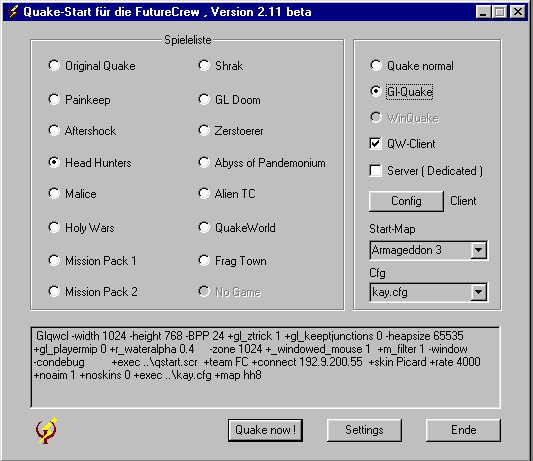
You only choose the game you want to play
and start it with "Quake now!" ( Ok, before you can
start, you have to do some adjustment ).
With the Button "Config"
you enter the Client-/Server-Menu.
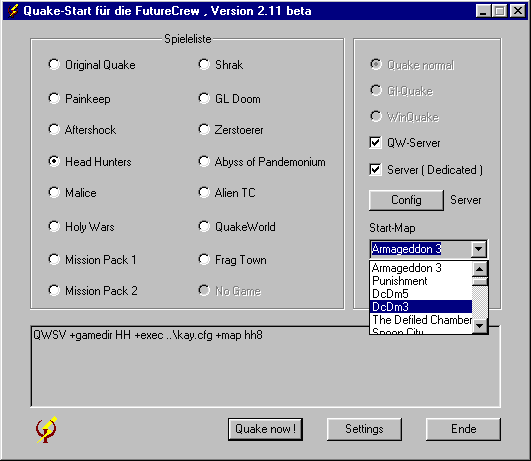
Here you can see the new startmap-selection
The "Settings":
I placed only the important switches on the main-desktop of "Q-Start". With a click on the "Settings"-button you get to the other options where you can add your own settings and configs. Here You can add up to 4 personal config-files for your scripts and aliasses. Afterwards You can choose them from the mainmenu. The files must be placed in Your Quake-directory. Otherwise You must add the relative path to the files before the name ( e.g. "configs\mycfg.cfg" ).
The default-settings of "Q-Start" are good for a fast and goodlooking gameplay ( specically for Gl-Quake ), but there are certainly some settings for a faster game ( please tell my your best settings ). With the default-settings I get 65 fps on a P200MMX with Monster 3D II (800 * 600) and 40 fps on a P133 with Monster 3D 1 (640 * 480) .
Don't forget to add "-heapsize xxxxx" where xxxxx is half of your RAM in the "Gl-Options" !
After the first start of "Q-Start" there is only one game-button ( Original Quake for the game in the directory ID1 ). You can add your other Missions simply by typing the directoryname ( where the mission is placed, e.g. "ROGUE" for Mission-Pack 2 ) followed by a name for the button ( max. 20 characters ) im the editor of the "Games"-menu.
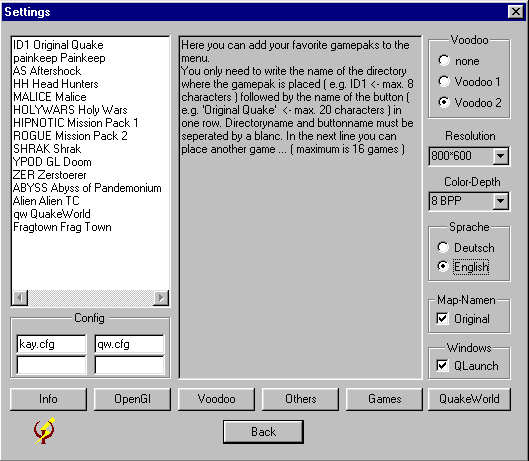
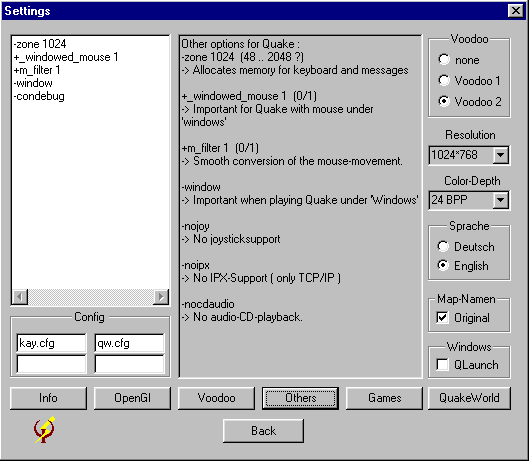
With the buttons "OpenGl" and "Voodoo" you get to the special settings for you graphic-accelerator-card and OpenGl ( this settings will only be used when you activate GlQuake ), with the button "Others" you can modify the settings which are used with every version of Quake. In this menu you can also activate the crosshair with the order "+crosshair 1" or you can set the skill with "+skill 2". By clicking the Button "QuakeWorld" you open an Editor-Window for QuakeWorld-Options ( they will only be executed when you start a QuakeWorld-Client ). Here you can enter Options like "rate" or "max_fps".
The Client-Server-Menu:
The picture shows you the various Settings for the Server and the Client. If you select "Server" in the Mainmenu only the upper part of this menu is enabled.
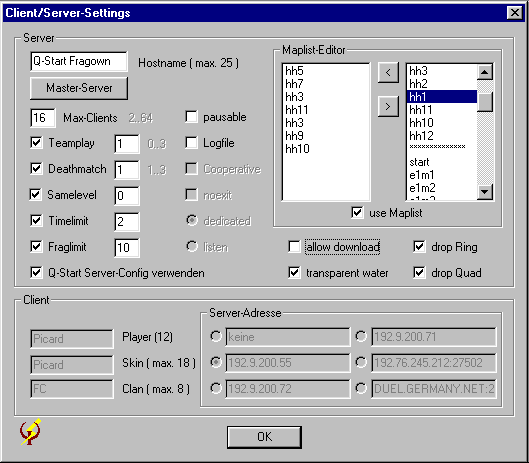
Q-Start saves this Settings in two different Files: "q-start.qws" for the QuakeWorld-Server and "q-start.svr" for the "normal" Server. A QuakeWorld-Server always searches for the file "server.cfg" in the actual Mod-Directory. If the File does not exist, QuakeWorld will search for it also in the Directory "id1" and in the Directory "qw". Q-Start also searches in the current Directory for the "server.cfg" and will create the file if it is'nt present. If the file exist, Q-Start only adds the line "exec q-start.qws" in the last line of the File. So the Server will exec all commands of your original "server.cfg" and all commands of the Q-Start-Server-Config. This will cause the Server to use the Q-Start-Settings because they are executed after the original settings. If you want to start a Mod with not supported Settings you've to write them in the File "server.cfg" of the Mod-Directory.
Description of the Parameter :
| Hostname | The name of your Server |
| Master-Server | Opens the Master-Server "Menü" ( see below ) |
| Max-Clients | maximum Number of Players on your Server |
| Teamplay |
0 -> no Teams. You can hurt yourself and others 1 -> You can't hurt yourself nor your Teammates 2 -> You can hurt yourself, your Teammates, and you will loose one frag for killing a Teammate 3 -> You can hurt yourself but you cannot hurt your Teammates. |
| Deathmatch |
0 -> no Deathmatch ( not QuakeWorld ) 1 -> You can pick up Weapons and Items and they will respawn 2 -> You can pick up a Weapon once. Picked up Items will not respawn 3 -> You can pick up a Weapon once. Picked up Items will respawn |
| Samelevel |
normal Quake : QuakeWorld : |
| Timelimit | Timelimit that will trigger the Server to change the Map |
| Fraglimit | Number of frags that will trigger the Server to change the Map |
| pausable | enables the Client-Command "pause" to pause the game |
| Logfile | forces the Server to create the File "qconsole.log" ( normal Quake ) or the File "frag_xx.log" ( QuakeWorld ). |
| cooperative | Play together against the Quake-Enemies ( maximum 4 Players ) |
| no exit | no Mapchange after a Player try to leave the running game through the Exit |
| dedicated | Start a dedicated Server ( you can't play on it ) for more then 6 Players |
| listen | Start a listen Server ( you can play on it ) for up to 6 Players ( not QuakeWorld ) |
| allow download | Allows Clients to download Maps ... from the Server |
| transparent water | activates the serverside Support for transparent water (QuakeWorld only ) |
| drop ring | if a player with the "Ring of Shadows" is fragged, other players can pick up the Ring (QuakeWorld only ) |
| drop quad | if a player with the "Quad-Damage" is fragged, other players can pick up the Quad (QuakeWorld only ) |
| use maplist | activates the use of the Q-Start-Maplist ( QuakeWorld only ) |
| use Q-Start-Server | activates the use of the Q-Start Server Config |
With the Maplist-Editor you can create a rotating Maplist ( QuakeWorld only ) very fast. In the right window are listed all available Maps, in the left window you can see the actual Maplist. You can add a map to the list simply by doubleclicking a Map in the right window or remove a map by doubleclicking on a map in the Maplist-Window. When you enable the Maplist, the server starts the game with the first map and continues with the following maps. After reaching the End the first map is selected again.
By clicking on the Button "Master-Server"
you can enter 10 Master-Server-Addresses and activate up to 8
of them at the same time. After starting the QuakeWorld-Server
it will tell all selected Masterserver the current game running
on your server ( only if an WWW-Connection is active ). This
allows other Quake-Players in the WWW to play on your Server.
The Client-Settings :
Here you can modify some Client-Settings.
If you add a name in the field "Player-Name" , it will
be saved by Q-Start in the file "qstart.scr". The next
time you start Quake by pressing "Quake now !" Q-Start
will add the order "+exec qstart.scr" to the command-string.
Also it is possible to add a team-shortcut in the field "Clan-Name"
and a skin ( only for Quake-World ). The skin must be placed
in the directory \qw\skins\. At least I added 5 input-fields
for your favorite server-adresses ( only Quake-World ! ). If
you choose here any adress, Q-Start adds the order "+connect
adress " to the command-String. The port can be added
directly behind the adress separated by a ":" !
 Button for Links
Copyright ã 1999-2006 by Kay-Peter Wulff