

Here you can find some useful tips and infos about Q2Start, the Quake-Launcher for Quake 2
It would be nice to get some suggestions about Q2Start via Email.
About "Q2Start":
Q2Start is my second frontend for Quake. This time it is designed for Quake 2. Like Q-Start, it gives now Quake 2 a nice place on the Windows-Desktop and an easy way to start the various game-paks. Allthough it is possible to edit nearly all the options for a fast and goodlooking gameplay. You can start single-player or multiplayer-games with one mouse-click.
Highlights:
- simple start of Single-Player,
Multi-Player-Client and Multi-Player-Servers
- up to 16 mods can
be included very fast ( only 6 in the shareware-version ) .
- simlpe parameter-menu (
for OpenGl and windows-options ) with examples and defaultsettings
and helpfull descritions.
- quick selection of a startmap
out of all available Maps ( showing the original Mapnames
).
- Servermenu with
a superfast Maplist-Editor ( selection with a doubleclick
)
- serverstart with
two clicks ( listen and dedicated ).
- 8 IP-adresses can
be saved, playername and skin-support.
- Import of the Quake
2-IP-Adress-Book
- Support for up to 4 personal
configurations-files
- Link between gamebutton and the
"config" used with the game ( Config-Link
).
- Sound-support ( Q2start.wav -
if present - will be played when you click on "Quake now!"
)
The "Quake-Center" :
Here you can see how easy gameplay can be...
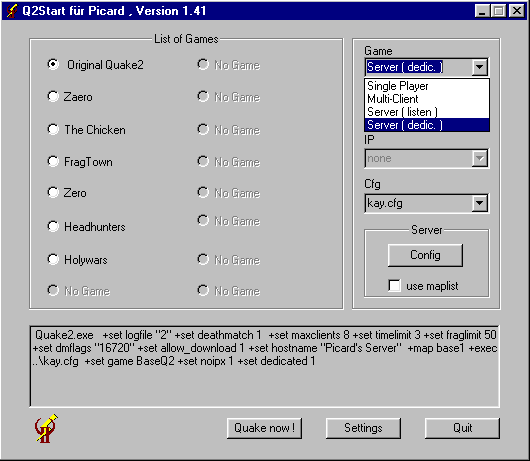
You only choose the game you want to play and start it with "Quake now!" ( Ok, before you can start, you have to do some adjustment ).
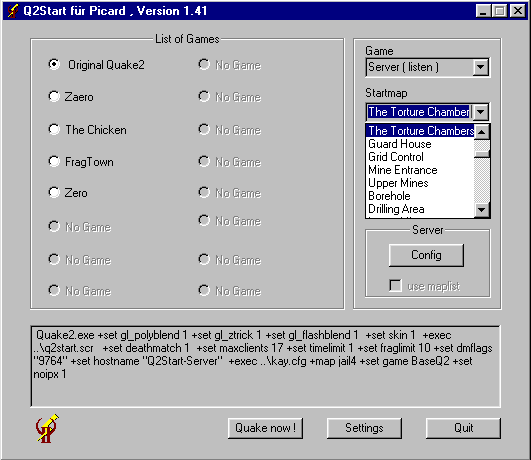
If you want to play a special map, you
can now choose the map directly from the mainmenu. In the new
pulldown-window are listed all maps
which are included in the files "pak0.pak" und "pak1.pak"
( in the directory "baseq2" ) and all maps in the directory
"baseq2\maps". If you select a Mod (e.g. Zaero ) Q2Start
will add the maps of this mod to the list ( therefor Q2Start
searches through the file "pak0.pak" in the actual
gamedirectory and in the directory "gamedir\maps").
When you start Quake2 with a "+exec
..."-command it is important to choose a startmap, because
Quake2 will not start correctly without a startmap.
The Serversettings:
With a click on the "Config"-Button in the field "Server" you open the server-menu :
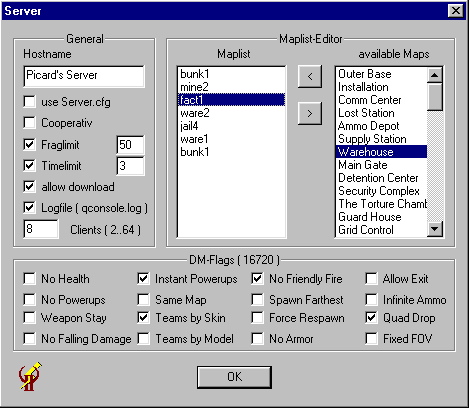
In this menu I've integrated
a "Map-List-Creator" ( this works only, when you
start a dedicated server !!! ) :
All available maps are shown in
the right window. You can add a map to the Maplist ( left ) by
double-clicking it or with a click on the "<"-Button.
With ">" or a double-click on a map in the left
window the map will be removed from the Maplist. When you start
a Server with activated "use maplist" the Server will
play all the selected maps. The changing of the maps can be driven
by time ( Timelimit ) or Frags ( Fraglimit ). When you start
a Server with this feature you don't need to select a Startmap
- Q2Start takes the first map of the list.
You can start a server in cooperative-mode
by activating the switch "Cooperativ". With the
switch "server.cfg" the file "server.cfg"
in your current game-directory will be executed when you start
a server. Here You can also set the Deathmatch-Flags. For more
Information about the Flags take a look in the Q2Start-Documentation
or the Quake2-Documentation.
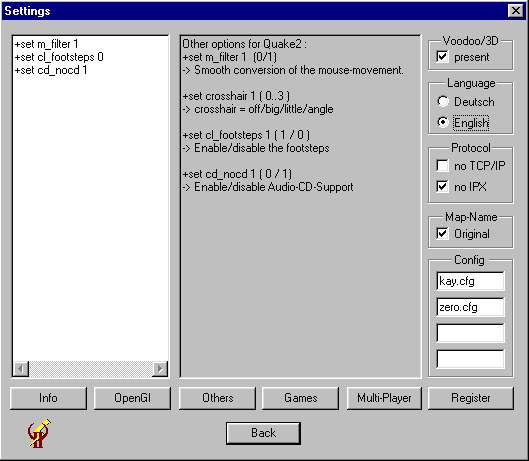
The "Settings":
I placed only the important switches on the main-desktop of "Q2Start". With a click on the "Settings"-button you get to the other options where you can add your own settings and configs. Here you can add up to 4 personal config-files for your scripts and aliasses. Afterwards you can choose them from the mainmenu. The files must be placed in your Quake2-directory. Otherwise you must add the relative path to the files before the name ( e.g. "configs\mycfg.cfg" ).
The default-settings of "Q2Start" are good for a fast and goodlooking gameplay ( specically for Gl-Quake ), but there are certainly some settings for a faster game ( please tell my your best settings ). With the default-settings I get 27 fps on a P200MMX with Monster 3D (640 * 480) and 65 fps on a P2-300 with Monster 3D II (800 * 600) .
After the first start of "Q2Start" there is only one game-button ( "Original Quake 2" for the game in the directory "BASEQ2" ). You can add your other Missions simply by typing the directoryname ( where the mission is placed, e.g. "ROGUE" for the Add-On "Ground Zero" ) followed by a name for the button ( max. 20 characters ) in the editor of the "Games"-menu.
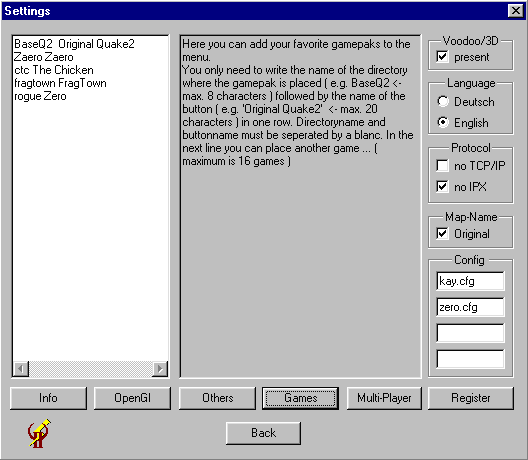
With the button "OpenGl" you get to the special settings for OpenGl ( this settings will only be used when you activate Voodoo or Voodoo 2 ), with the button "Others" you can modify the settings which are used every time you start Quake2.
The Multiplayer-Page:
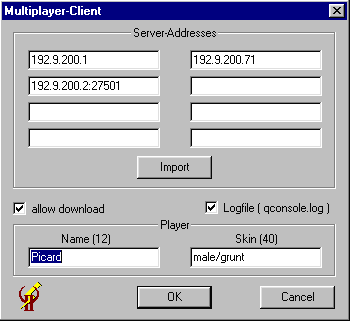
You get to this page by pressing the "Multi-Player"-Button.
Here you can modify some settings for a
multiplayer-game. If you add a name in the field "Player-Name"
, it will be saved by Q2Start in the file "q2start.scr".
The next time you start Quake2 by pressing "Quake now !"
Q2Start will add the order "+exec q2start.scr" to the
command-string. Also it is possible to add a skin. Before the
skin you must insert the name of the model-directory. At least
I added 8 input-fields for your favorite server-addresses.You
can also import them from your Quake2-config-file by pressing
"Import". The adresses can be choosen later directly
from the main-menu. The port can be added directly behind
the adress separated by a ":" !
Here you can tell Quake2 to create a Logfile
from the console and you can allow Quake2 to download Maps and
Skins ... from the Server.
Button for Links
Copyright ã 1999-2006 by Kay-Peter Wulff